WordPress plugin · Version 1.0.0
The GDPR chatbot that sets itself up in WordPress
Mignuti Chatbot runs on any website — one line of code, like a tracking pixel. On WordPress it is even simpler: install the plugin, click "Connect" once, done. No key copying, no theme editing, no cookie-banner tinkering.
GPLv2 · 18 KB · WordPress 6.0 – 7.1 · PHP 7.4+ · on the official WordPress directory
-
7.1
Tested with WordPress 7.1.1
runs on 6.0+, PHP 7.4+
-
0
Errors in the official Plugin Check
all five categories
-
10
Languages in the plugin
EN, DE, FR, ES, IT, NL, PL, RU, TR, HR
-
5
Cookie banners wired natively
without a line of code
What it looks like in your WordPress
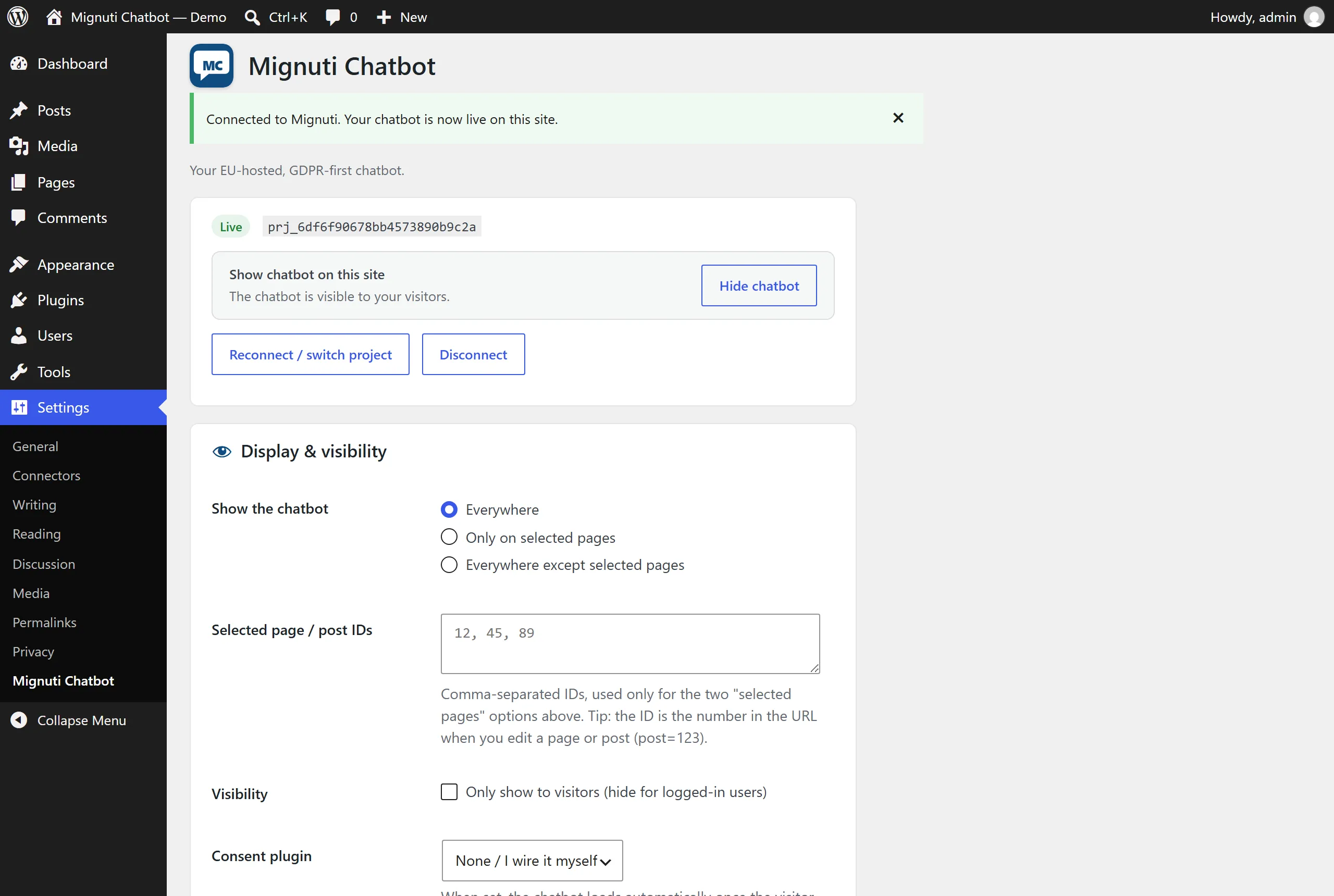
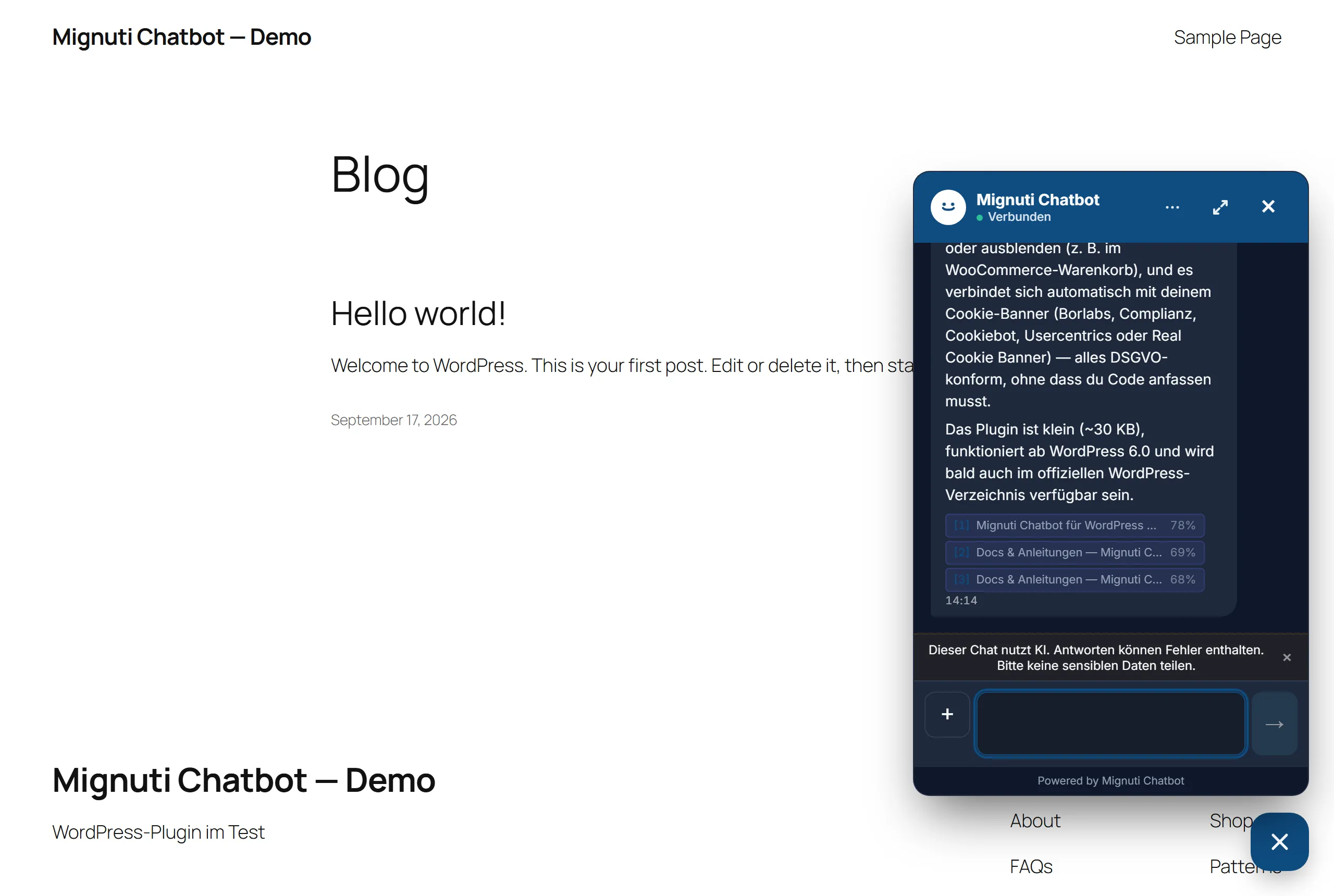
Real captures from WordPress 7.1.1 — the settings page after connecting on the left, the bot on a fresh install as your visitors see it on the right.
What the plugin takes off your plate
One-click connect
No copy-pasting keys. Click "Connect with Mignuti", pick a project, done — key and domain are set automatically. The secret never leaves your browser.
Page targeting
Show it everywhere, only on selected pages, or everywhere except some — by page ID, no shortcodes.
WooCommerce-friendly
One checkbox hides the bot on the cart and checkout. It helps on product pages and stays out of the way at the till.
GDPR consent bridge
Pick your cookie banner — Borlabs, Complianz, Cookiebot, Usercentrics or Real Cookie Banner. The bot loads only after consent. Before that: no request, no cookie.
One-click on/off
Hide the bot site-wide without disconnecting. Your settings are kept, one click brings it back.
Built-in connection test
One button checks the CDN, the API, your key and whether your domain is allowed — four green ticks instead of guessing.
Cache plugin detected
LiteSpeed, WP Rocket, W3 Total Cache, WP Super Cache, WP Fastest Cache, Cache Enabler, SiteGround: the plugin tells you when to clear the cache.
Visitors only
Hide it for logged-in users — ideal for membership sites, courses and editorial teams who do not want to see the bot themselves.
Uninstalls cleanly
On deletion the plugin removes all of its own options from the database. No leftovers, no orphaned entries.
GDPR is not fine print — it is built in
Most chatbots leave wiring up cookie consent to you. We do not: pick your consent plugin and Mignuti loads only once your visitors agree. Before that no script runs and no session is opened — as far as the browser is concerned, the widget does not exist yet.
- Borlabs Cookie
- Complianz
- Cookiebot
- Usercentrics
- Real Cookie Banner
Different banner? One line does it: window.MignutiChatbot.setConsent("granted")
What the plugin sends — and what it does not
The same facts are in the plugin readme under "External services". Here without the digging.
Goes to Mignuti (server in Germany)
- Visitor messages and the path of the page they were asked on
- Browser language and a random session ID
- The IP address — only as a salted hash for rate limiting
- On connect, once: the one-time code and your domain (server to server)
Stays with you
- No WordPress user accounts, no e-mail addresses of your members
- No WooCommerce orders, no carts
- No contents of your database — the bot learns from what you give it in the Mignuti admin
- Nothing before consent is granted (in GDPR-safe mode)
For the AI reply itself the same applies as everywhere on our site: messages go to Anthropic masked (USA, standard contractual clauses), EU-only per bot on request. All details on the trust page →
Live in three steps
Install
In WordPress go to Plugins → Add New, search for "Mignuti Chatbot", install and activate. Updates arrive automatically from then on. Prefer uploading a file? The ZIP below is the same version.
Connect
Under Settings → Mignuti Chatbot click "Connect with Mignuti", sign in and pick your project — or create a new one right there.
Live
The chat appears on your site. Fine-tune it under "Display & visibility", clear the cache once if you use a cache plugin — done.
On the official WordPress directory
Listed on WordPress.org since 26 September 2026 — reviewed and approved by the plugin team, version 1.0.0. You will find "Mignuti Chatbot" straight in the plugin search of your WordPress install; updates arrive automatically through WordPress. Prefer uploading a file? The ZIP here is identical to the directory build. Listing on WordPress.org →
- Slug
mignuti-chatbot - Review passed on 25 September 2026
- GPLv2, source open
- Provider: Mignuti Media, Lahnstein, Germany
Frequently asked questions
Does the plugin run on the current WordPress version?
Yes. Version 1.0.0 is tested with WordPress 7.1.1, runs on WordPress 6.0 and later and needs PHP 7.4 or newer. The official WordPress.org Plugin Check reports zero errors in all categories.
Is the plugin in the official WordPress directory?
It was submitted on 21 September 2026; the automated scan passed and the manual review by the plugin team is in progress. Until approval you download the exact same version here that is under review.
Does it work with my theme or page builder?
Yes. The plugin hooks in the standard WordPress way (wp_enqueue_script in the footer) and needs no theme changes. It works with every theme that calls wp_footer() — which is practically all of them, Elementor, Divi and Gutenberg included.
Do I need an account, and what does it cost?
The plugin is free and open source (GPLv2). For the chat you need a Mignuti Chatbot account: 7-day free trial, then from 9 EUR per month (Lite, 500 messages). Plans are on the pricing page.
Is the chatbot GDPR-compliant?
Yes, with one caveat we state openly: platform data (database, files) lives on our own server in Germany. For the AI reply, chat messages go — after automatic masking of personal data — to Anthropic in the USA (EU standard contractual clauses 2021/914); embeddings run via OpenAI (USA). If you would rather not, switch the bot to EU-only mode (Azure OpenAI EU). A data processing agreement is included and conversations are anonymised after 90 days.
How exactly does the cookie-banner bridge work?
You pick your consent plugin in the settings. The plugin listens for that banner’s accept event and passes the consent on to the widget. Until then nothing is loaded and no session is opened. Using a different banner? One line does it: window.MignutiChatbot.setConsent("granted").
What happens when I delete the plugin?
On uninstall the plugin removes all of its own options from the WordPress database. Your Mignuti project and its knowledge base are untouched — you can reconnect any time.
Not on WordPress? Mignuti Chatbot runs anywhere a <script> tag is allowed —
Shopware,
JTL-Shop,
Shopify, Webflow, static
sites, React, Vue.
See all install guides →
Version 1.0.0 · or download the ZIP (18 KB, identical to the directory build)