Legal & privacy
Accessible chatbot: what the EAA asks of you
Does your chat widget fall under the European Accessibility Act and Germany's BFSG? Who is covered, who isn't, and a checklist for an accessible chatbot.
Contents
The European Accessibility Act has applied across the EU since 28 June 2025. In Germany it is implemented by the Barrierefreiheitsstärkungsgesetz (BFSG). If you run an online shop for consumers and add a chatbot to it, the question comes up quickly: does the chat window have to be accessible too? This article explains who the rules cover, why a chatbot on a covered website is part of it, and how to recognise an accessible chatbot under the European Accessibility Act. We use the German law as the example, because that’s where most of our customers are.
Not legal advice. We explain the legal position in general terms, as we understand it (as of November 2026). If you’re unsure whether your business is covered, ask a lawyer.
Who the rules cover
The BFSG applies to certain products and to consumer services provided after 28 June 2025 (section 1 BFSG). For websites, one group matters most: e-commerce services. Under section 2 no. 26, these are services provided through a website or app with a view to concluding a consumer contract. In plain terms: online shops and similar offerings where consumers book or buy something.
According to Germany’s Federal Accessibility Agency (Bundesfachstelle Barrierefreiheit), these are not covered:
- Pure B2B offerings. If you only sell to businesses, the agency says you “should” not be affected by the BFSG.
- Pure information websites with no contract on offer, such as a company site where nothing can be ordered. That’s the agency’s reading; no court has confirmed it.
There is also an exemption for microenterprises, and it only applies to services (section 3(3)). Under section 2 no. 17, a microenterprise employs fewer than ten people and has either an annual turnover or an annual balance sheet total of no more than 2 million euros. Both conditions must be met. An example: a shop with eight staff and 3 million euros in turnover can still be exempt if its balance sheet total stays below 2 million. A shop with twelve staff is not exempt, however small its turnover.
For contracts concluded before 28 June 2025, section 38 allows a transition period until 27 June 2030 at the latest. New shops and new customers get no transition period.
Why the chatbot counts
We haven’t found any official statement specifically about chatbots. The agency’s FAQ does suggest, though, that the whole website has to meet the requirements, not just the checkout. On that widely held reading, a chat widget on a covered shop is included. It makes sense, too: when a visitor asks the chat about delivery times or returns, that’s part of the path to a purchase.
The technical benchmark is the standard EN 301 549, which in its currently cited version broadly corresponds to WCAG 2.1 level AA. According to the agency, a newer version based on WCAG 2.2 has already been published. If you aim for WCAG 2.2 AA today, you’re well prepared.
Enforcement in Germany sits with the joint market surveillance body of the federal states for accessibility (MLBF) in Magdeburg. Section 37 provides for fines of up to 100,000 euros, for example for offering a service that isn’t accessible, and up to 10,000 euros for other breaches. Competitors do send cease-and-desist letters. Whether the BFSG counts as a market conduct rule under German competition law is disputed, though, and the courts haven’t settled it.
Checklist: how to recognise an accessible chatbot
Chat widgets have their own pitfalls, because their content keeps changing. You can check these points on any widget yourself:
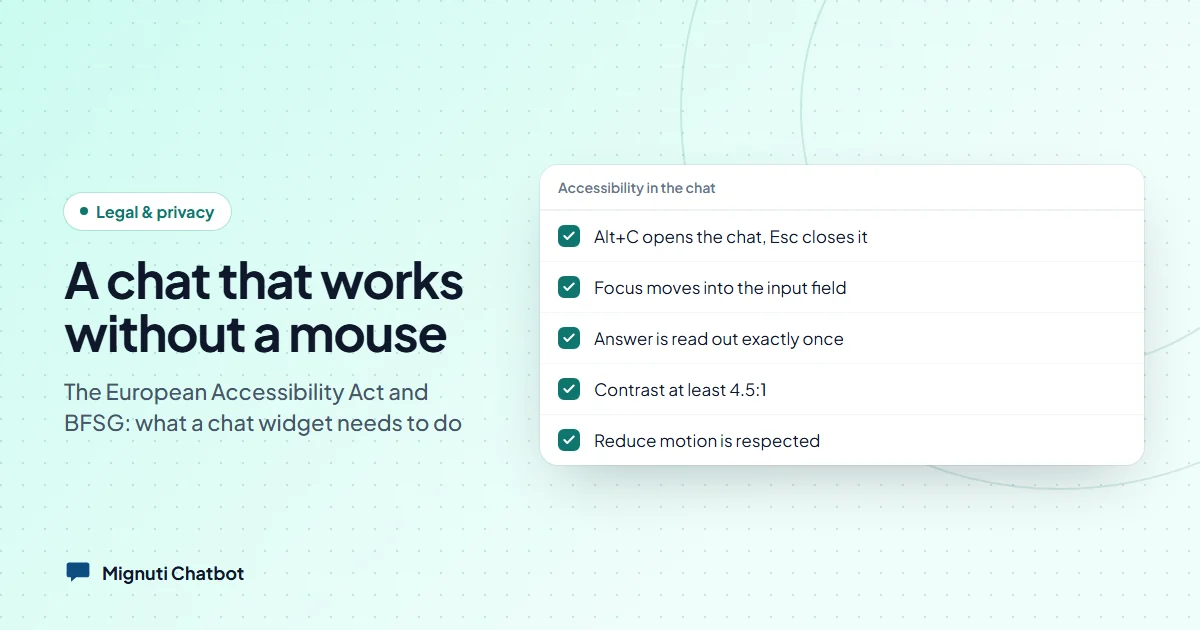
- Keyboard. Can you open, use and close the chat without a mouse? Does Tab reach every button, and does Esc close the window?
- Focus. Does focus move into the chat window when it opens, stay there while it’s open, and return to the chat button when it closes?
- Announce new messages without repeating everything. A screen reader should read a new answer once. Not word by word while it’s being written, and not the whole history on every change.
- Contrast. Text needs at least 4.5:1 against its background. Watch out for brand colours: white text on a light green header looks smart and is often unreadable.
- Zoom and reflow. At 200 and 400 per cent zoom, nothing should be cut off and nothing should scroll sideways.
- Touch targets. Buttons should be big enough to hit reliably with a finger. WCAG 2.2 requires at least 24 × 24 pixels; 44 × 44 is the comfortable size.
- Reduced motion. If someone has “reduce motion” switched on in their operating system, they shouldn’t see bouncing or wobbling animations.
- Labels. The input field needs a label, icon buttons need a name the screen reader can read out.
- Language. The chat window should declare its language so the screen reader pronounces it correctly.
And one point that comes from a different law: Article 50(5) of the EU AI Act requires the “you’re talking to an AI” notice itself to be accessible. More on that in AI Act chatbot disclosure: what Art. 50 asks.
What the Mignuti widget brings
We checked the points above against our widget’s code. This is built in:
- Keyboard: Alt+C opens and closes the chat, Esc closes it. The controls are regular buttons you can reach with Tab.
- Focus: The chat window is marked up as a dialog. When it opens, focus moves into the input field; it stays inside the window while it’s open and returns to the chat button when it closes.
- Announcements: The conversation history doesn’t announce changes by itself, but you can read through it at any time. A separate, invisible announcement region says “Typing…” when an answer starts and reads the finished answer exactly once, without Markdown asterisks. A change in connection status is only announced when it actually happens, not as soon as the chat opens.
- Contrast with brand colours: You can pick any accent colour. The widget then decides whether text on it needs to be white or black to reach at least 4.5:1. Where your accent colour is used for text or links inside the chat, the widget lightens or darkens it as needed until the contrast is sufficient. If you choose a light background, the rest of the text switches to dark automatically.
- Zoom: On narrow screens, and therefore also at high zoom levels, the chat window fills the whole screen instead of sitting in a small box at the edge.
- Touch targets: The close button, suggested questions and the main controls are at least 44 pixels tall.
- Motion: The widget’s animations follow the “reduce motion” setting.
- Labels and language: The input field is labelled and the chat window declares the interface language. The AI notice is linked to the window and the input field, so screen readers read it out when the chat opens.
Our full accessibility statement is in the legal section, and details on the AI notice are under AI disclosure.
Where it’s down to you
An accessible widget doesn’t make an accessible website. A few things are on your side:
- The page around it. The chat is one part of your website. If the checkout can’t be used, the best widget won’t help.
- The chat button on your page. How well the round chat button stands out depends on your page background, which the widget doesn’t know. An accent colour that is close to your background makes the button hard to find. Check it once with a contrast tool.
- Your texts. The greeting, suggested questions and the content the bot answers from all come from you. Short, clear sentences help everyone.
- Answers in another language. The widget declares the interface language. If the bot answers a visitor in English while the interface is German, that individual answer isn’t separately marked as English. That’s a limitation we know about.
- Your cookie banner. If the chat only starts after consent, the consent tool has to be accessible too. That lies outside our widget.
Bottom line
If you run a shop for consumers and you’re not a microenterprise, assume your chat widget has to be accessible too. The checklist above lets you test any widget yourself in half an hour, ours included. If you’re looking for a chatbot that already covers these points, you can try Mignuti Chatbot free for seven days.
Your own chatbot, built from your content
Add your website, upload PDFs or connect a folder. The bot answers only from your sources. Try it free for 7 days.