Knowledge sources
Site blocks your bot? 402, 403 and Cloudflare
Your bot knows nothing from your website? Usually a bot protection is blocking our crawler. What 402 and 403 mean and how to allow it in Cloudflare.
Contents
You added your website as a knowledge source, but the bot doesn’t know a single page of it. Or the crawl stops right after the home page. In most cases the problem is not your website itself but something in front of it: a bot protection takes our crawler for an unwanted visitor and won’t let it through.
That is not a fault on Cloudflare’s or your host’s side. These protections are meant to do exactly that: fend off automated requests. They just can’t tell a stranger’s AI bot from the crawler you hired yourself.
How to tell
Since October 2026 the Mignuti admin tells you directly what is going on. Under Knowledge, next to the URL source, you will see one of two messages:
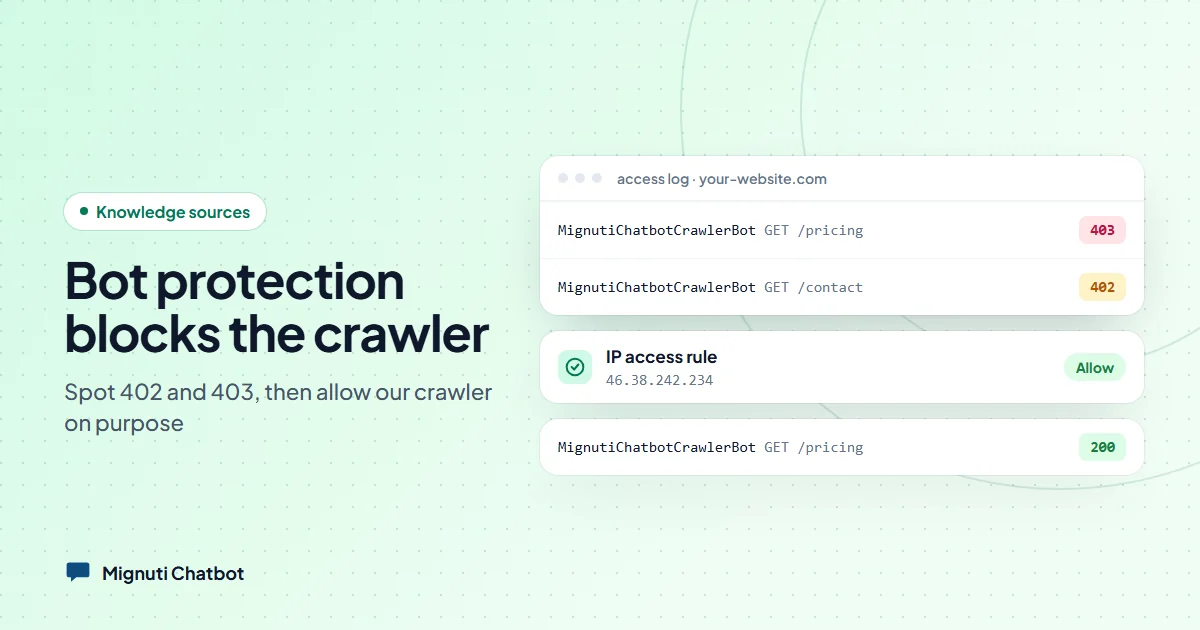
- “Your website blocks our crawler”: the website answered with 403 (“forbidden”), coming from a bot protection such as Cloudflare.
- “Your website asks crawlers to pay”: the website answered with 402 (“payment required”). That is Cloudflare’s “Pay per Crawl” feature.
Both messages link to our crawler page with the instructions.
What is behind a 403
Cloudflare offers several switches that fend off automated requests. The most common ones among our customers:
- Block AI bots: a single switch that locks out known AI bots. Quick to turn on, easy to forget.
- Bot Fight Mode: blocks anything that looks automated. On the free plan this is the usual cause.
- AI Crawl Control: a list of known crawlers where you choose “Allow” or “Block” per bot.
A 403 can also come from a firewall rule at your host or a WordPress security plugin. In that case the admin shows a general error instead of the Cloudflare hint.
What is behind a 402
With “Pay per Crawl”, a website can charge AI companies for letting their crawlers read its content. Whoever doesn’t pay gets the answer 402 instead of the page. That is a deliberate choice by the site owner, and for third-party AI companies it can make sense. For your own chatbot, you obviously don’t want to pay yourself. So you exempt our crawler from the rule.
How to allow our crawler
Our crawler identifies itself as MignutiChatbotCrawlerBot and comes from the IP address 46.38.242.234.
- IP access rule (all Cloudflare plans): Security → WAF → Tools → IP Access Rules. Add
46.38.242.234with the action “Allow” for your website. This is the key step: Bot Fight Mode cannot be bypassed with an exception rule, but an IP access rule that matches first does the job. - On Pro and above, additionally: a WAF rule with the action “Skip” for requests whose user agent contains
MignutiChatbotCrawlerBot, skipping Super Bot Fight Mode and the bot rules. - AI Crawl Control / Pay per Crawl: if our crawler appears in the list, set it to “Allow”. If it doesn’t, the IP access rule from step 1 is enough.
Then, in the Mignuti admin under Knowledge, click “Re-crawl now” on the URL source.
No access to Cloudflare because an agency runs your website? Just send them the link to our crawler page. It has everything they need.
Other reasons the bot finds nothing
Not every empty knowledge source is a bot protection. We regularly see three other causes:
- robots.txt blocks it. Our crawler respects robots.txt. If it says
Disallow: /for all bots or forMignutiChatbotCrawlerBot, it reads nothing. That is a choice on your side, which you change in robots.txt. - The content is built with JavaScript. The crawler does not run JavaScript. If your website assembles its text in the browser, it sees an almost empty page. The fix: upload the key content as PDF or text, or enter questions and answers directly.
- The content sits behind a login. Pages that require signing in can’t be read by the crawler. An upload helps here too.
Protection stays on, only we get in
You don’t have to switch off your bot protection to use the chatbot. The exception applies to our crawler only, every other bot stays blocked as before. Which other AI bots you want to let in is a separate question. If you’d like help with that: Mignuti Media sets it up as a service.
Still not working after allowing it? Write to us, ideally with the website address, and we will check which answer our crawler gets.
Your own chatbot, built from your content
Add your website, upload PDFs or connect a folder. The bot answers only from your sources. Try it free for 7 days.